
The Output of docker images has changed.
Here’s how to get it back.
What’s Happened?#
The output of the command docker images has changed
It used to look like this:
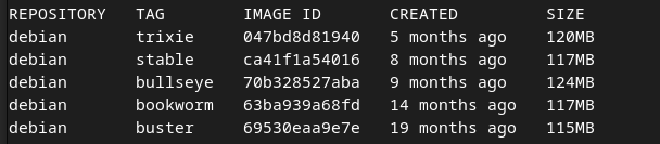
and it now looks like this:

How and when was it changed ?#
It was changed in this PR: https://github.com/docker/cli/pull/6566
and released in version 29.0.0
How to get the old version#
There are 2 ways to get it back
Via CLI#
Adding the option --format=table to the command will output the tables in the
older format.
for example:
docker images -a --format=table
Via Config file changes#
Edit your docker config here: ~/.docker/config.json
and add this line:
"imagesFormat": "table {{.Repository}}\t{{.Tag}}\t{{.ID}}\t{{.CreatedSince}}\t{{.Size}}"`
Note: Thats a json file.
You may need to add a
, to the end of the line you add or
the line preceeding it depending where you added it in.